0. 목표와 아키텍처
목표는 “RFID 리더기에서 발생하는 이벤트(입고/출고/조정)를 스트리밍으로 처리해서” 아래를 만드는 것이다.
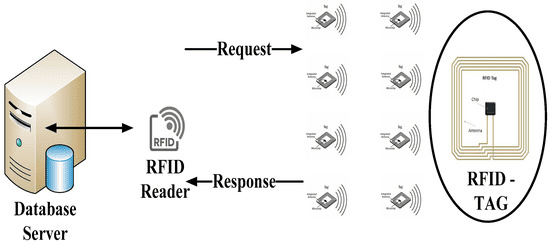
실시간 스트리밍
kafka 토픽으로 들어오는 이벤트를 소비(consume)
이벤트 원장(Event Ledger)를 Postgres에 Append-only로 저장
현재 재고(Current lnventory)를 실시간으로 업데이트
Redis에 캐시로 " 현재 재고 조회"를 빠르게 제공
배치
Airflow로 "일일 스냅샷(재고 히스토리)" 생성
Airflow로 "출고 예측(MA7)" 생성
시각화(Analytice)
Metabase에서 재고/스냅샷/예측/원장 모니터링 대시보드 구성
전체 흐름 - (Data Flow)
0단계 WLS2, DOCKER
1단계 Producer(테스트) → Kafka 토픽 rfid_events
2단계 Consumer Step2 → Postgres rfid_events 적재
3단계 Consumer Step3 → Postgres inventory_current 업데이트 (+Redis 옵션)
4단계 Airflow DAG → inventory_snapshot_daily / shipment_forecast_daily 생성
5단계 Metabase → 대시보드
0-1. 프로젝트 폴더 생성 & 기본구조
mkdir -p ~/rfid-pipeline
cd ~/rfid-pipeline
rfid-pipeline/
docker-compose.yml
sql/
00_schema.sql
producer/
produce_events.py
consumer/
consumer_step1_print.py
consumer_step2_pg.py
consumer_step3_inventory_pg.py
0-2. docker-compse.yml로 인프라 올리기
나는 “Kafka 이미지를 어떤 걸 쓰느냐" 였고, Bitnami태그에 문제를 겪었다.
failed to resolve reference docker.io/bitnami/kafka:3.7.0 ... not found
그래서 confluentinc/cp-kafka:7.6.1로 바꾸면서 해결했다.
services:
  zookeeper:
    image: confluentinc/cp-zookeeper:7.6.1
    environment:
      ZOOKEEPER_CLIENT_PORT: 2181
      ZOOKEEPER_TICK_TIME: 2000
    ports:
      - "2181:2181"

  kafka:
    image: confluentinc/cp-kafka:7.6.1
    depends_on:
      - zookeeper
    ports:
      - "9092:9092"
    environment:
      KAFKA_BROKER_ID: 1
      KAFKA_ZOOKEEPER_CONNECT: "zookeeper:2181"
      KAFKA_LISTENER_SECURITY_PROTOCOL_MAP: PLAINTEXT:PLAINTEXT,PLAINTEXT_HOST:PLAINTEXT
      KAFKA_ADVERTISED_LISTENERS: PLAINTEXT://kafka:9092,PLAINTEXT_HOST://localhost:9092
      KAFKA_LISTENERS: PLAINTEXT://0.0.0.0:9092,PLAINTEXT_HOST://0.0.0.0:9092
      KAFKA_INTER_BROKER_LISTENER_NAME: PLAINTEXT
      KAFKA_OFFSETS_TOPIC_REPLICATION_FACTOR: 1

  postgres:
    image: postgres:16
    environment:
      POSTGRES_DB: warehouse
      POSTGRES_USER: app
      POSTGRES_PASSWORD: app_pw
    ports:
      - "5432:5432"
    volumes:
      - pgdata:/var/lib/postgresql/data

  redis:
    image: redis:7
    ports:
      - "6379:6379"

  metabase:
    image: metabase/metabase:latest
    ports:
      - "3000:3000"
    depends_on:
      - postgres

volumes:
  pgdata:
0-3. 컨테이너 실행
cd ~/rfid-pipeline
docker compose up -d
docker compose ps
여기서 /Zookeeper 이름이 이미 사용중이라 conflict 가 났었다.
Conflict. The container name "/zookeeper" is already in use...
docker rm -f zookeeper
docker compose down
docker system prune -a  # (주의: 이미지까지 정리)
0-4. Postgres 스키마 만들기(원장/현재재고/스냅샷/예측)
sql/00_schema.sql
create table if not exists rfid_events (
  event_id uuid primary key,
  event_ts timestamptz not null,
  ingested_ts timestamptz not null default now(),
  event_type text not null,      -- IN / OUT / ADJUST
  sku text not null,
  location text not null,
  qty int not null,
  device_id text,
  ref_event_id uuid
);

create table if not exists inventory_current (
  sku text not null,
  location text not null,
  qty_on_hand int not null default 0,
  updated_at timestamptz not null default now(),
  primary key (sku, location)
);

create table if not exists inventory_snapshot_daily (
  date date not null,
  sku text not null,
  location text not null,
  qty_on_hand int not null,
  computed_at timestamptz not null default now(),
  primary key (date, sku, location)
);

create table if not exists shipment_forecast_daily (
  date date not null,
  sku text not null,
  location text not null,
  forecast_qty int not null,
  method text not null, -- ma7
  computed_at timestamptz not null default now(),
  primary key (date, sku, location, method)
);
적용
docker compose exec postgres psql -U app -d warehouse -f /dev/stdin < sql/00_schema.sql
확인
docker compose exec postgres psql -U app -d warehouse -c "\dt"
python은 총 3단계로 디벨럽했다.
Step1 — Kafka Consumer “읽기만” (print)
import json
from confluent_kafka import Consumer

KAFKA_BOOTSTRAP = "localhost:9092"
TOPIC = "rfid_events"

c = Consumer({
    "bootstrap.servers": KAFKA_BOOTSTRAP,
    "group.id": "rfid-step1",
    "auto.offset.reset": "earliest",
})

c.subscribe([TOPIC])
print("step1: consuming...")

try:
    while True:
        msg = c.poll(1.0)  # 최대 1초 대기 후 메시지가 있으면 가져옴
        if msg is None:
            continue

        # Kafka 레벨 오류(브로커 연결 실패 등)
        if msg.error():
            print("Kafka error:", msg.error())
            continue

        # 메시지 value(bytes)를 UTF-8 문자열로 바꾸고 JSON 파싱
        evt = json.loads(msg.value().decode("utf-8"))
        print("RECV:", evt)

finally:
    c.close()
코드 분석
- Consumer({...})
- bootstrap.servers: Kafka 접속 주소
- group.id: 컨슈머 그룹. 같은 그룹이면 파티션을 나눠 읽음.
- auto.offset.reset="earliest": 처음 실행할 때 오프셋이 없으면 처음부터 읽음
- c.subscribe([TOPIC])
- 이 순간 “이 컨슈머가 읽을 토픽”을 확정
- c.poll(1.0)
- Kafka는 push가 아니라 pull이라서, 컨슈머가 주기적으로 poll 해야 메시지를 받음
- Step1은 목적이 딱 하나:
- Kafka로 이벤트가 들어오고, 내가 받아서 JSON으로 해석할 수 있다를 검증
Step2 — Kafka → Postgres “원장(ledger) 적재”
import json
from confluent_kafka import Consumer
import psycopg2

KAFKA_BOOTSTRAP = "localhost:9092"
TOPIC = "rfid_events"
PG_DSN = "dbname=warehouse user=app password=app_pw host=localhost port=5432"

c = Consumer({
    "bootstrap.servers": KAFKA_BOOTSTRAP,
    "group.id": "rfid-step2",
    "auto.offset.reset": "earliest",
})

conn = psycopg2.connect(PG_DSN)
conn.autocommit = True  # Step2는 단순 INSERT라 편하게 autocommit 사용

# 중복 event_id면 무시(멱등성, idempotency)
INSERT_EVENT = """
insert into rfid_events(event_id, event_ts, event_type, sku, location, qty, device_id, ref_event_id)
values (%s, %s, %s, %s, %s, %s, %s, %s)
on conflict (event_id) do nothing
returning event_id;
"""

c.subscribe([TOPIC])
print("step2: consuming + inserting into Postgres...")

try:
    while True:
        msg = c.poll(1.0)
        if msg is None:
            continue
        if msg.error():
            print("Kafka error:", msg.error())
            continue

        evt = json.loads(msg.value().decode("utf-8"))

        # 필수키 체크 (데이터 품질 최소 방어)
        required = ["event_id", "event_ts", "event_type", "sku", "location", "qty"]
        if any(k not in evt for k in required):
            print("Invalid event:", evt)
            continue

        device_id = evt.get("device_id")
        ref_event_id = evt.get("ref_event_id")

        with conn.cursor() as cur:
            cur.execute(
                INSERT_EVENT,
                (
                    evt["event_id"],
                    evt["event_ts"],
                    evt["event_type"],
                    evt["sku"],
                    evt["location"],
                    int(evt["qty"]),
                    device_id,
                    ref_event_id,
                ),
            )
            row = cur.fetchone()

        if row is None:
            print("Duplicate ignored:", evt["event_id"])
        else:
            print("Inserted:", row[0])

finally:
    c.close()
    conn.close()
코드 분석
1) “원장(ledger)”이란?
- 이벤트를 삭제/수정하지 않고 계속 append 하는 테이블
- 나중에 문제가 생기면 “원장만 있으면” 재처리가 가능함
2) on conflict (event_id) do nothing returning event_id
이게 Step2의 핵심.
- event_id가 이미 들어간 이벤트면 중복
- 중복이면 insert를 하지 않고(do nothing)
- returning event_id가 없어서 fetchone()이 None이 됨
- 그럼 “중복이라 스킵” 처리
즉, Step2는 “중복 처리(멱등성)”을 DB에 맡기는 구조야.
3) any(k not in evt for k in required) 의미
- required 리스트에 있는 키들을 하나씩 검사하면서
- 하나라도 없으면(True) → any(...)가 True → invalid event 처리
- k: required 리스트에서 꺼낸 “키 이름” (문자열)
- evt: Kafka 메시지(JSON)를 파싱한 “딕셔너리(객체)”
Step3 — 원장 적재 + 현재재고 업데이트 + Redis 옵션
step3은 실시간 재고 목적이다.
트랜잭션의 흐름을 안전하게 하기 위해 설계했다.
1. rfid_events에 INSERT 시도
2. 중복이면 → 재고 업데이트 절대 하면 안 됨
3. 신규 이벤트면 → inventory_current upsert로 증감 반영
4. commit
import json
import uuid
from confluent_kafka import Consumer
import psycopg2
import redis

KAFKA_BOOTSTRAP = "localhost:9092"
TOPIC = "rfid_events"
PG_DSN = "dbname=warehouse user=app password=app_pw host=localhost port=5432"

# Redis는 선택이지만 실시간 조회용으로 같이 쓰면 좋음
R = redis.Redis(host="localhost", port=6379, decode_responses=True)

def delta(evt: dict) -> int:
    """
    이벤트를 '재고 증감값'으로 바꾸는 규칙
    - IN  : +qty
    - OUT : -qty
    - ADJUST : qty를 그대로 반영 (qty가 음수면 감소)
    """
    q = int(evt["qty"])
    t = evt["event_type"]
    if t == "IN":
        return q
    if t == "OUT":
        return -q
    return q  # ADJUST

c = Consumer({
    "bootstrap.servers": KAFKA_BOOTSTRAP,
    "group.id": "rfid-step3",
    "auto.offset.reset": "earliest",
    # 운영적으로는 enable.auto.commit을 끄고 DB commit 이후에 수동 커밋이 더 안전함.
    # 지금은 학습용이라 기본값(자동 커밋)로 둠.
})

conn = psycopg2.connect(PG_DSN)
conn.autocommit = False  # Step3는 "원장 insert + 재고 update"를 한 트랜잭션으로 묶는 게 핵심

INSERT_EVENT = """
insert into rfid_events(event_id, event_ts, event_type, sku, location, qty, device_id, ref_event_id)
values (%s, %s, %s, %s, %s, %s, %s, %s)
on conflict (event_id) do nothing
returning event_id;
"""

UPSERT_INV = """
insert into inventory_current(sku, location, qty_on_hand)
values (%s, %s, %s)
on conflict (sku, location) do update
set qty_on_hand = inventory_current.qty_on_hand + excluded.qty_on_hand,
    updated_at = now();
"""

c.subscribe([TOPIC])
print("step3: consuming + (insert event) + (update inventory_current)...")

try:
    while True:
        msg = c.poll(1.0)
        if msg is None:
            continue
        if msg.error():
            print("Kafka error:", msg.error())
            continue

        evt = json.loads(msg.value().decode("utf-8"))

        # 필수키 검증
        required = ["event_id", "event_ts", "event_type", "sku", "location", "qty"]
        if any(k not in evt for k in required):
            print("Invalid event:", evt)
            continue

        # optional 키 기본값 처리
        evt.setdefault("device_id", None)
        evt.setdefault("ref_event_id", None)

        # event_id가 uuid 형태가 아닌 경우를 방어(깨끗하게 normalize)
        try:
            event_id = str(uuid.UUID(evt["event_id"]))
        except Exception:
            print("Invalid UUID:", evt["event_id"])
            continue

        sku, loc = evt["sku"], evt["location"]
        d = delta(evt)

        try:
            with conn.cursor() as cur:
                # (1) 원장 Insert
                cur.execute(
                    INSERT_EVENT,
                    (
                        event_id,
                        evt["event_ts"],
                        evt["event_type"],
                        sku,
                        loc,
                        int(evt["qty"]),
                        evt["device_id"],
                        evt["ref_event_id"],
                    ),
                )
                row = cur.fetchone()

                # 중복이면: 재고 업데이트 금지
                if row is None:
                    conn.rollback()
                    print("Duplicate ignored:", event_id)
                    continue

                # (2) 현재 재고 업데이트(증감 반영)
                cur.execute(UPSERT_INV, (sku, loc, d))

            # (3) DB 커밋
            conn.commit()

            # (4) Redis 캐시 업데이트(선택)
            key = f"inv:{sku}:{loc}"
            R.incrby(key, d)

            print("Applied:", event_id, "delta=", d, "->", key, R.get(key))

        except Exception as e:
            conn.rollback()
            print("DB error:", e, "evt=", evt)

finally:
    c.close()
    conn.close()
코드 분석
왜 autocommit=False를 했는가
Step3는 “원장 insert”와 “재고 update”가 한 세트다.
- 원장 insert 성공했는데 재고 update 실패하면? → 데이터 불일치
- 재고 update 먼저 하고 원장 insert 실패하면? → 더 큰 문제
그래서 Step3는 트랜잭션으로 묶어서 “둘 다 성공하면 commit, 하나라도 실패하면 rollback”이 맞다
2) 중복 이벤트를 왜 이렇게 처리하나?
중복이면 INSERT_EVENT ... returning 결과가 None
그 순간:
- conn.rollback() 하고
- 재고 업데이트/Redis 업데이트를 하지 않고 continue
→ 이렇게 해야 “같은 이벤트가 두 번 들어와도 재고가 두 번 증가하지 않음”
3) UPSERT_INV의 핵심
- 기존 row가 있으면 “현재 값 + 이번 증감값”으로 누적
- 없으면 새로 생성
4) Redis는 “파이썬에서 쓰는 것”이 맞아?
Redis는 별도 DB/캐시 서버고,
파이썬에서는 redis 라이브러리로 접근해서 값을 읽고/증가시키는 방식.
- DB(Postgres)가 진짜 소스 오브 트루스
- Redis는 “빠른 조회를 위한 캐시”
문제점 : Kafka 오프셋 커밋이 “DB commit”보다 먼저 될 수도 있음
기본 설정은 auto commit이라서, DB 실패가 나도 Kafka는 “읽었다”로 처리될 가능성이 있다.(이건 추후에 디벨롭 해보기로 했다.)
'데이터 엔지니어링' 카테고리의 다른 글
| [WSL + Airflow] RFID 실시간/배치 파이프라인 03 - Dag 코드(스냅샷/예측) (0) | 2026.01.03 |
|---|---|
| [AirFlow+Metabase+트러블슈팅] - RFID 실시간/배치 파이프라인 02(중요) (0) | 2026.01.03 |
| [DBT] - Data build tool (1) | 2025.12.29 |
| [Refactoring] - DAU·CTR·CVR·ARPU 배치 파이프라인 (0) | 2025.12.19 |
| [Airflow] - Dag 생성 (0) | 2025.12.18 |