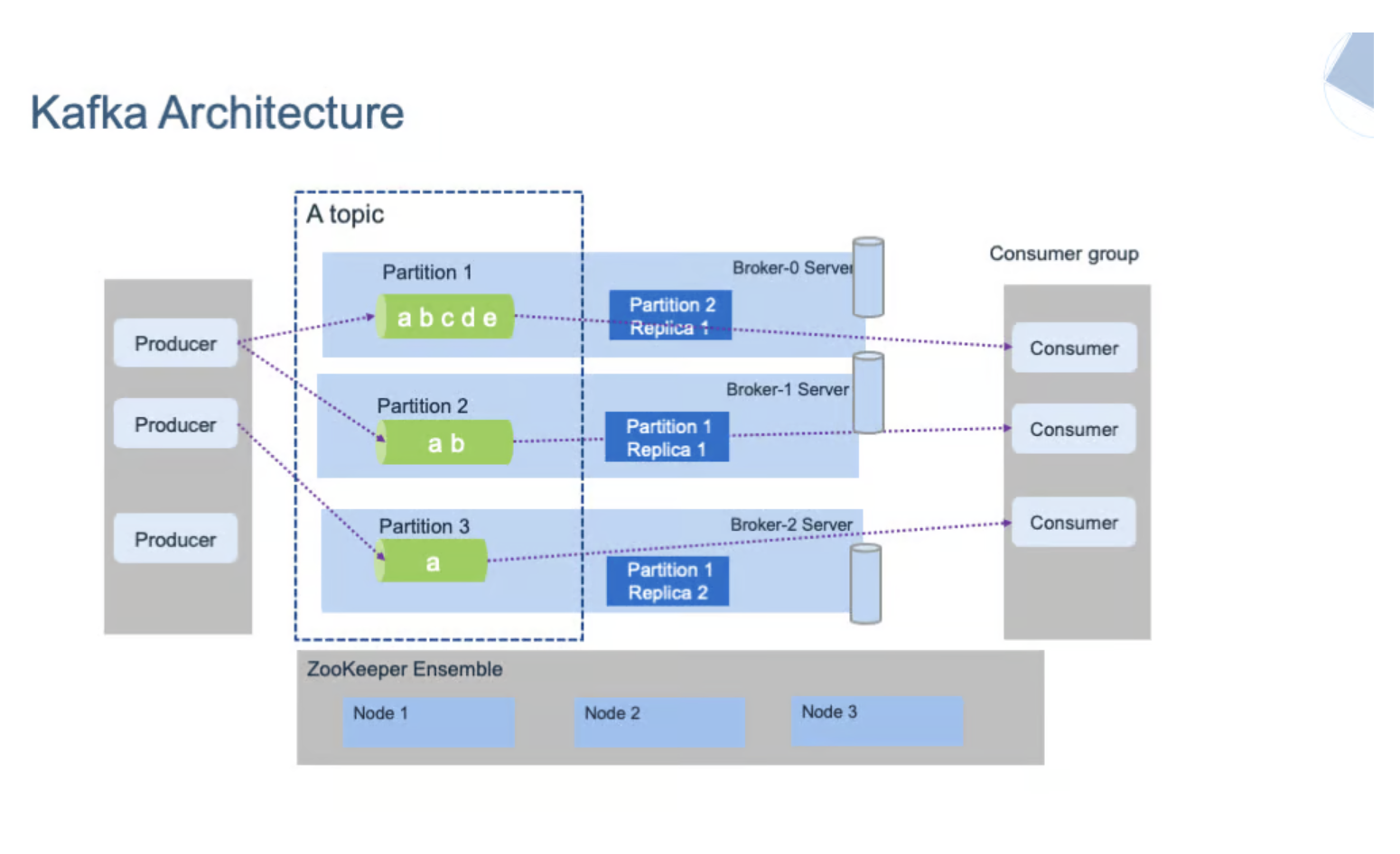
Apache Kafka란?
Apache Kafka는 LinkedIn에서 개발한 분산 스트리밍 플랫폼으로, 대용량의 실시간 데이터 피드를 처리할수 있는 고성능 메세징 시스템이다. 빅데이터 환경에서 실시간 데이터 파이프라인을 구축하고 스트리밍 애플리케이션을 개발하는 데 널리 사용된다.
Kafka의 주요 특징
- 높은 처리량: 초당 수백만 건의 메시지 처리 가능
- 확장성: 클러스터 확장이 용이함
- 내구성: 디스크에 데이터를 저장하여 데이터 손실 방지
- 분산 시스템: 여러 서버에 분산되어 고가용성 보장
설치 전 준비사항
1.시스템 요구사항
Kafka를 설치하기 전에 다음 사항을 확인해야 한다.
- 운영체제: Linux, macOS, Windows 모두 지원
- Java: JDK 8 이상 필수 (JDK 11 또는 17 권장)
- 메모리: 최소 4GB RAM (프로덕션 환경에서는 16GB 이상 권장)
- 디스크: 최소 10GB 이상의 여유 공간
2.Java 설치 확인
Kafka는 JVM 위에서 동작하므로 Java 설치가 필수다.
# Java 버전 확인
java -version

# JAVA_HOME 환경변수 확인
echo $JAVA_HOME
Java가 설치되어 있지 않다면 먼저 설치를 진행한다.
# Ubuntu/Debian
sudo apt update
sudo apt install openjdk-11-jdk

# CentOS/RHEL
sudo yum install java-11-openjdk-devel
Kafka 설치하기
1.Kafka 다운로드
Apache Kafka 공식 웹사이트에서 최신 버전을 다운로드 한다.
# Kafka 다운로드 (예: 3.6.0 버전)
wget https://downloads.apache.org/kafka/3.6.0/kafka_2.13-3.6.0.tgz

# 압축 해제
tar -xzf kafka_2.13-3.6.0.tgz

# 디렉토리 이동
cd kafka_2.13-3.6.0
2.디렉토리 구조 이해하기
kafka_2.13-3.6.0/
├── bin/              # 실행 스크립트
├── config/           # 설정 파일
├── libs/             # 라이브러리
└── logs/             # 로그 파일
ZooKeeper 설정 및 실행
참고: Kafka 2.8.0 버전부터는 KRaft 모드를 지원하여 ZooKeeper 없이도 실행이 가능하지만, 여기서는 전통적인 ZooKeeper 방식을 설명한다.
1.ZooKeeper 설정 파일 수정
# ZooKeeper 설정 파일 열기
vi config/zookeeper.properties
주요 설정 항목
# 데이터 저장 디렉토리
dataDir=/tmp/zookeeper

# 클라이언트 포트
clientPort=2181

# 최대 클라이언트 연결 수
maxClientCnxns=0
2.ZooKeeper 실행
# ZooKeeper 서버 시작
bin/zookeeper-server-start.sh config/zookeeper.properties

# 백그라운드로 실행
bin/zookeeper-server-start.sh -daemon config/zookeeper.properties
Kafka 브로커 설정 및 실행
1.브로커 설정 파일 수정
# Kafka 설정 파일 열기
vi config/server.properties
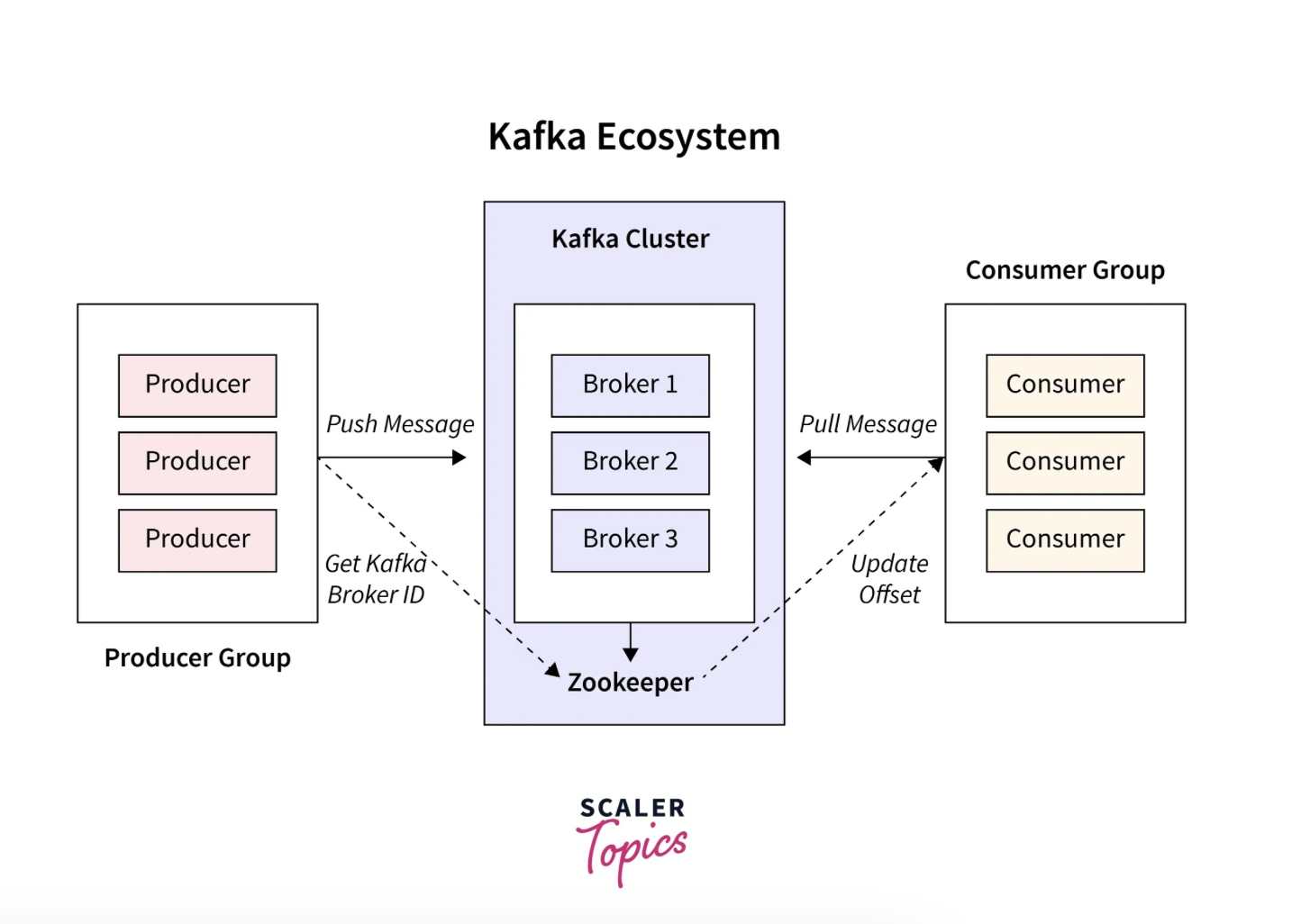
2.필수 설정 항목
# 브로커 ID (클러스터 내에서 고유해야 함)
broker.id=0

# Kafka 서버가 수신할 주소
listeners=PLAINTEXT://localhost:9092

# 로그 데이터를 저장할 디렉토리
log.dirs=/tmp/kafka-logs

# 파티션 수 (기본값)
num.partitions=1

# ZooKeeper 연결 정보
zookeeper.connect=localhost:2181

# 로그 보관 시간 (168시간 = 7일)
log.retention.hours=168

# 로그 세그먼트 파일 크기
log.segment.bytes=1073741824
3.고급 설정 옵션
# 자동 토픽 생성 허용 여부
auto.create.topics.enable=true

# 복제 팩터 (프로덕션에서는 최소 3 권장)
default.replication.factor=1

# 최소 In-Sync Replica 수
min.insync.replicas=1

# 압축 타입 (none, gzip, snappy, lz4, zstd)
compression.type=producer

# 메시지 최대 크기
message.max.bytes=1000012
4.Kafka 브로커 실행
# Kafka 서버 시작
bin/kafka-server-start.sh config/server.properties

# 백그라운드로 실행
bin/kafka-server-start.sh -daemon config/server.properties
설치 확인 및 테스트
1. 토픽 생성
# 테스트용 토픽 생성
bin/kafka-topics.sh --create \
  --topic test-topic \
  --bootstrap-server localhost:9092 \
  --partitions 1 \
  --replication-factor 1
2. 토픽 목록 확인
# 생성된 토픽 목록 조회
bin/kafka-topics.sh --list \
  --bootstrap-server localhost:9092

# 토픽 상세 정보 확인
bin/kafka-topics.sh --describe \
  --topic test-topic \
  --bootstrap-server localhost:9092
3. 메세지 송수신 테스트
Producer로 메세지 전송
# Producer 콘솔 실행
bin/kafka-console-producer.sh \
  --topic test-topic \
  --bootstrap-server localhost:9092

# 메시지 입력 (Enter로 전송)
> Hello Kafka!
> This is a test message
Consumer로 메세지 수신
# 새 터미널에서 Consumer 실행
bin/kafka-console-consumer.sh \
  --topic test-topic \
  --from-beginning \
  --bootstrap-server localhost:9092

Kafka 클러스터 구성하기
프로덕션 환경에서는 고가용성을 위해 여러 브로커로 굿성된 클러스터를 운영한다.
1. 추가 브로커 설정
# server-1.properties 생성
cp config/server.properties config/server-1.properties

# server-2.properties 생성
cp config/server.properties config/server-2.properties
2. 각 브로커 설정 수정
server-1.properties
broker.id=1
listeners=PLAINTEXT://localhost:9093
log.dirs=/tmp/kafka-logs-1
server-2.properties
broker.id=2
listeners=PLAINTEXT://localhost:9094
log.dirs=/tmp/kafka-logs-2
3. 추가 브로커 실행
# 브로커 1 실행
bin/kafka-server-start.sh -daemon config/server-1.properties

# 브로커 2 실행
bin/kafka-server-start.sh -daemon config/server-2.properties
4. 클러스터 확인
# 복제 팩터 3인 토픽 생성
bin/kafka-topics.sh --create \
  --topic replicated-topic \
  --bootstrap-server localhost:9092 \
  --partitions 3 \
  --replication-factor 3

# 토픽 상태 확인
bin/kafka-topics.sh --describe \
  --topic replicated-topic \
  --bootstrap-server localhost:9092
모니터링 및 관리
1. 주요 모니터링 항목
# 컨슈머 그룹 목록 조회
bin/kafka-consumer-groups.sh --list \
  --bootstrap-server localhost:9092

# 컨슈머 그룹 상세 정보
bin/kafka-consumer-groups.sh --describe \
  --group my-group \
  --bootstrap-server localhost:9092

# 로그 디렉토리 확인
du -sh /tmp/kafka-logs
2. 성능 테스트
# Producer 성능 테스트
bin/kafka-producer-perf-test.sh \
  --topic test-topic \
  --num-records 100000 \
  --record-size 1024 \
  --throughput -1 \
  --producer-props bootstrap.servers=localhost:9092

# Consumer 성능 테스트
bin/kafka-consumer-perf-test.sh \
  --topic test-topic \
  --messages 100000 \
  --bootstrap-server localhost:9092
문제 해결 (Troubleshooting)
자주 발생하는 문제
ZooKeeper 연결 실패
# ZooKeeper 상태 확인
echo ruok | nc localhost 2181

# ZooKeeper 로그 확인
tail -f logs/zookeeper.out
포트 충돌
# 포트 사용 확인
netstat -an | grep 9092
lsof -i :9092

# 프로세스 종료
kill -9 <PID>
디스크 공간 부족
# 디스크 사용량 확인
df -h

# 로그 정리
bin/kafka-configs.sh --alter \
  --entity-type topics \
  --entity-name test-topic \
  --add-config retention.ms=3600000 \
  --bootstrap-server localhost:9092
2.로그 확인
# Kafka 로그 확인
tail -f logs/server.log

# ZooKeeper 로그 확인
tail -f logs/zookeeper.out
보안 설정(선택사항)
1. SSL/TLS 설정
# server.properties에 추가
listeners=SSL://localhost:9093
security.inter.broker.protocol=SSL
ssl.keystore.location=/var/private/ssl/kafka.server.keystore.jks
ssl.keystore.password=your-password
ssl.key.password=your-password
ssl.truststore.location=/var/private/ssl/kafka.server.truststore.jks
ssl.truststore.password=your-password
2. SASL 인증 설정
# SASL/PLAIN 설정
listeners=SASL_PLAINTEXT://localhost:9092
security.inter.broker.protocol=SASL_PLAINTEXT
sasl.mechanism.inter.broker.protocol=PLAIN
sasl.enabled.mechanisms=PLAIN
다음 단계
Kafka를 성공적으로 설치하고 설정했다면 다음 내용을 학습해보세요:
- Producer API: Java/Python으로 메시지 생산 애플리케이션 개발
- Consumer API: 메시지 소비 및 처리 로직 구현
- Kafka Streams: 실시간 스트림 처리
- Kafka Connect: 외부 시스템과 데이터 연동
- 운영 최적화: 성능 튜닝 및 모니터링 도구 활용
참고 자료
Confluent Documentation | Confluent Documentation
docs.confluent.io
Documentation Redirect
Apache Kafka
kafka.apache.org
Kafka: The Definitive Guide, 2nd Edition
Every enterprise application creates data, whether it consists of log messages, metrics, user activity, or outgoing messages. Moving all this data is just as important as the data... - Selection from Kafka: The Definitive Guide, 2nd Edition [Book]
www.oreilly.com
마치며
Apache Kafka는 강력한 분산 스트리밍 플랫폼이지만, 초기 설정이 다소 복잡할 수 있습니다. 이 가이드를 다라 기본 설정을 완료했다면, 이제 실제 애플리케이션 개발을 시작할 준비가 되었습니다.
프로덕션 환경으로 이전하기 전에는 반드시 충분한 테스트를 진행하고, 보안 설정,백업 전략, 모니터링 시스템을 구축하는 것을 권장합니다.
'🔥 Data Engineer > Kafka' 카테고리의 다른 글
| [Kafka] - 카프카 관리툴의 종류와 특징 비교 (1) | 2026.01.09 |
|---|---|
| [Kafka] - Kafka Connect (0) | 2026.01.09 |
| [Kafka] - Kafka MirrorMaker 2란? (0) | 2026.01.08 |
| [Kafka] - Apache Kafka 4.0: 아키텍처 및 주요 특징 (1) | 2026.01.08 |
| [Kafka] - Quorum과 Kafka의 Quorum 동작방식 완벽가이드 (0) | 2026.01.08 |
